For Google (and other search engines) to find the pages, you need have links to the page from other sites.
- A community site (e.g. Parish Council) is a good start. You need to tell the administrator of the site the URL (address) of your online calendar. It probably looks like this: https://hallbookingonline.com/myvenue
- If you're not sure of the address (URL) of the public page:
- Log in as an administrator
- Click on the Public Page blue button

- If your venue has a Facebook page, you could add a post telling people about the new booking pages.
- Have you checked the results when you type in your venue's name into Google? If you're on a PC/Mac, you should see a column on the right with information about your venue. If it says ‘Add missing website’ or similar, it means Google doesn't know the website address. Look for a link to add missing information. If there's a map pointing to the wrong location, you can fix that too.
- Finally, we can submit the page to Google. Get in touch if you'd like us to do that.
You might also want to put a poster in the venue advertising the new online booking system. You can easily add a QR code to a poster like this one:
There are lots of free services to make QR codes if you search on the internet. You never need to pay or sign up for anything! Easier, however, is to use the Chrome browser to make on.
- Using Chrome, go to your public page.
- Right click anywhere on the page. You'll see a menu pop up. Choose the option to create a QR code.
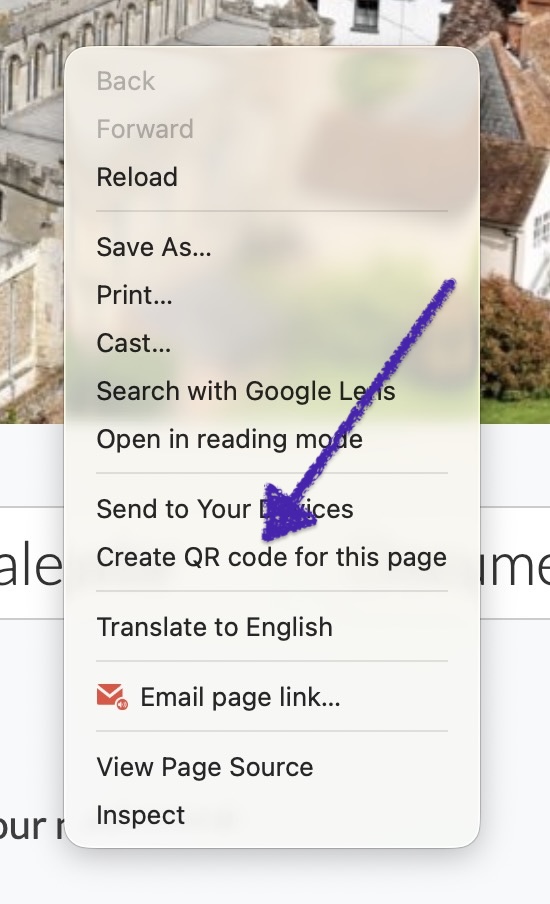
- You can then save the image to your computer and put it in a Word document.
If you need any help - or have further questions, please get in touch with Hall Booking Online Support. We'll be pleased to help you out!
Remember that changes aren't instant. It can take a few weeks for your pages to appear in the search engine results page.
Be very wary of anyone contacting you who suggests that they can move you instantly to the top of the search pages!
If you have any questions, get in touch with us!
Looking for more help?
Contact us if you need further assistance.